Thursday, July 5, 2012

Harmonies

I've been using my trusty Logitech Harmony 880 ever since I've got it of ebay almost 3 years ago (to replace my Harmony 628)

Recently it started acting up and refusing to accept key presses for the volume up and arrow up.
Apparently, its a known issue that only gets worse over time.

So, I've began looking for a replacement at an acceptable price, and about the same features as the 880 (I didn't want to get another 880, due to the same issue).


A couple of weeks ago, I came across an eBay bid for a broken Harmony 650. Now, I usually skip the broken listings. but this was 15$ (with 9$ shipping) and the only thing that was broken was the Micro USB connector (same as all the latest smartphones).

It arrived today, and I immediately set about to fix it.


Here it is before I've started working:

(note the hole with the missing micro usb connector).


Initially I tried to use a mini usb connector, but it was too big and did not fit within the remote.
luckily I had an old bluetooth ear piece lying around which I could use to source for the missing female micro usb connector.

The problem, is that the connector is very small, and it is quite hard to unsolder it.
So, instead of fighting it with my weller, I decided to use the "use more power" approach and stuck the entire bluetooth earpiece board in the oven (yes, an actual oven). I've set it to 220C and waited for about 10 minutes.
10 minutes later, all components (including the micro usb) just fell of the board, and I've continued to solder the connector to the remote.

Its not easy, and you will need another helping hand, but after about an hour of fine soldering, I was done.
A quick test connecting to my PC and updating the remote (migrating the config from the old 880) it booted up and was completely responsive.
I took it over to the living room (still without the case) and it was working (woohoo!!!!).

Here it is finished:


A new Harmony 650 is about 80$, I now have one for 24$, how cool is that?

Sunday, December 27, 2009

And now for something a bit different

Recently, a way to run unsigned code on the XBOX360 has been discovered. The hack involves having your XBOX360 hack itself (you heard right), and flashing a modified 8955 kernel which gets you the following benefits:
  • An ability to run unsigned code.
  • Convert XBOX Live! demos to Full.
  • Run games from anywhere (even a USB drive).
  • Use any SATA 2.5' drive you want.
(Maybe this will also lead to an XBOX360 XBMC, who knows)

There are a few caveats though:
  • Your XBOX must be with a dashboard version pre-89XX (ie: 7344)
  • You need to open your case (duh!)
  • You  need to have some good soldering skills.

In any case, and since I have a launch model box (XENON) that was banned around 2 years ago. I've decided to go for it.

I followed a great guide on www.xbox-scene.com forums, the guy there had a pretty nifty idea of doing everything in way that it will be later possible to re-do without re-opening your case again.

Before you begin, you'll need the following tools:

  • A 35W-60W Fine Tipped Soldering Iron.
  • Soldering Flux.
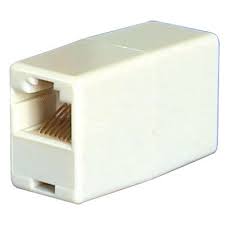
  • Female <-> Female RJ45 Connector
  • Some colored wires
  • A pretty good cutter
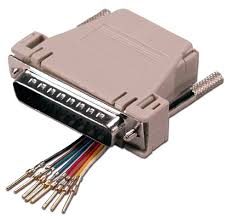
  • DB25 Connector and housing
  • An RJ45 cable
  • Hot glue gun
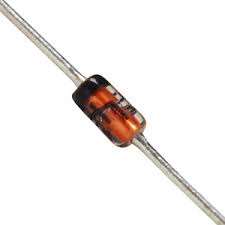
  • 2x 1N4148 Diodes
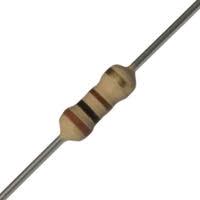
  • 5x 100ohm resistors

Here's how to do it:

  • You need to enable the JTAG hack (http://www.free60.org/JTAG_Hack).
    It should look something like this (Remember: this is for my XENON board, if you have a different one, the connections are not the same):


Monday, November 9, 2009

USplash Themes on Google Code

Hi All,

Long time with no updates...
Anyway, you can now get the source for my usplash themes directly from my Google Code site @ http://code.google.com/p/usplash-theme-xbmc/ .

P.S. I have corrected a long standing issue with all of the themes regarding the display of boot text (for example during an fsck task).

Enjoy,

Monday, July 20, 2009

USplash Previews

I have added all of my USplashes here so you can preview them before installation.


Sunday, July 19, 2009

Pulsating Logo

Hi,

I have finally fixed the issue with the pulsating logo (that's part of the LiveXBMC), that prevented the text box (used for FSCK mainly) from appearing.

I'll submit that into the Track in a few hours.

Enjoy.

Pulsating Logo

Hi,

I have finally fixed the issue with the pulsating logo (that's part of the LiveXBMC), that prevented the text box (used for FSCK mainly) from appearing.

I'll submit that into the Track in a few hours.

Enjoy.

Saturday, May 23, 2009

Long time without updates...

Hi Guys,

I know it has been a while without any updates or new splash themes,
part of the reason, is that me and my wife had a new amazing baby boy.

I'm now back on-track, trying to compile a new splash based on plymouth, and got some ideas for usplash.

So, hang tight, i'll have something for you guys soon.

Friday, May 8, 2009

Wednesday, December 24, 2008

New Blue

Here's a taste of my next project:

Tuesday, December 23, 2008

Mr. Blue has arrived...

It's time for a new theme, this time is the long overdue blue based theme.
Here's a screenshot:

Get it here.

This time I've increased the number of available resolutions that this usplash theme can support:
640x480
800x600
1024x768
1280x720
1366x768
1280x1024
1440x900
1680x1050
1920x1080
1920x1200

I'm also planning to re-release all previous themes with the above list of resolutions.

Monday, December 15, 2008

They keep coming...

Another week, another brand new bootsplash :)

This one has the XBMC Splash (the one that appears when you start XBMC) pulsating in the middle.

Here's a sample (it's kinda hard to show it pulsating in a screenshot):


Grab it here.

Thursday, December 11, 2008

Black - Now with more resolutions

I've added more resolutions to the theme:
640x480
800x600
1024x768
1280x720
1366x768
1280x1024
1440x900
1920x1080
1920x1200

Note: you can try and force Usplash for a specific resolution by editing (or creating) /etc/usplash.conf:
xres=1280
yres=1024


Grab it here.

Monday, December 8, 2008

Black XBMC USplash Theme

Well, here it is...

Please consider it a very preliminary (just a taste) version.
It contains all the popular resolutions I could think of.

Get it here .

Sunday, December 7, 2008

The new USplash in black

Another sample of my new USplash theme, this time in black.

Enjoy.

New XBMC Splash

Hi all,

I'm working on a new XBMC bootsplash:

Any comments? Ideas? Questions?

Saturday, December 6, 2008

New splash engine!

Hi all!

I've been away for a while... (new baby on the way)

Anyways, apparently, the guys at fedora have been working on an amazing new boot splash engine named plymouth (YouTube: here and here).
Their goals are to create a more streamlined boot process (less flickering) and nicer effects.

You can experiment with plymouth on Fedora Linux 10.

What's all this have to do with XBMC? - You wait and see :)

Thursday, November 13, 2008

Thursday, September 18, 2008

XBMC USplash theme

Here is my contribution to the awesome XBMC project.

This USplash theme will transform your boot experience into a cleaner media experience, the result will look something like this:


So, how to install this? (Ubuntu only)

  1. Download the usplash-theme-xbmc-v2.zip
  2. Extract that into your home folder.
  3. run sudo apt-get install usplash libbogl0 libbogl-dev libgd2-noxpm libgd2-noxpm-dev usplash-dev build-essential
  4. Change into the usplash-theme-xbmc-v2 folder.
  5. run make.
  6. Copy the resulting usplash-theme-xbmc.so to your home folder.
  7. Run sudo apt-get install startupmanager.
  8. Run the newly install app in the gnome menu System -> Administration -> Start-Up Manager
  9. Select the apperance tab and under Usplas Themes, Click Manage themes, and select the usplash-theme-xbmc.so file.
  10. Select that from the list of themes and click Close.
  11. Enjoy your new boot splash.